Start with a photograph.
Open an original camera JPEG. Explore the picture mode, white balance, and supported color settings behind the image.
What your camera records ↗अपने Olympus या OM System कैमरे के लिए फ़ोटो स्टाइल बनाएँ, सहेजें और साझा करें। iPhone, iPad और Mac के लिए नेटिव ऐप।
iPhone · iPad · Mac Coming soon
You’re viewing a preview of this language. The full site is currently available in English. Read in English ↗

Less editing. More intention.
You know it when you see it. The warmth in a shadow. A quieter green. Black and white that feels just right.
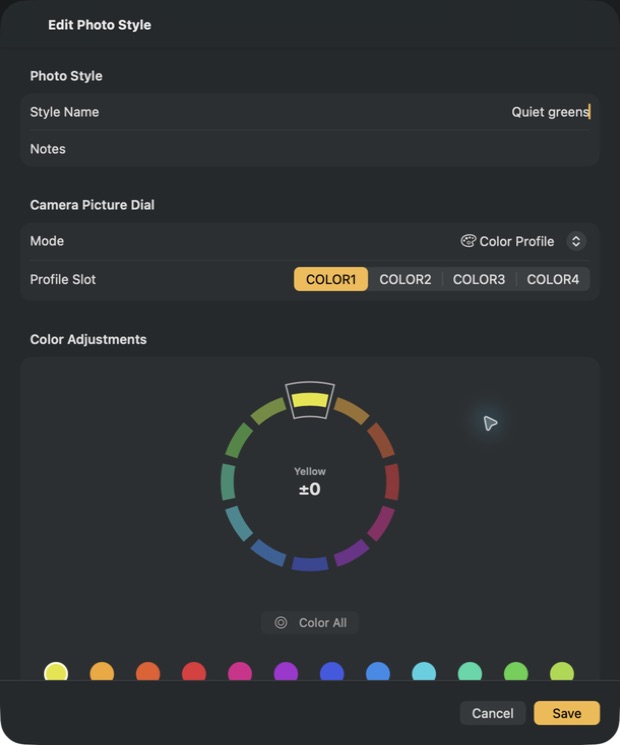
Maitani gives those choices a home. Read the style inside a camera JPEG, make it your own, and keep your favorite recipes close at hand.
Open an original camera JPEG. Explore the picture mode, white balance, and supported color settings behind the image.
What your camera records ↗Fine-tune color and tone. Save the result as a recipe, organize it into a collection, and share it with another photographer.
Use supported camera connections and recipe exports to bring a look into your shooting workflow. Available steps depend on your camera.
Find your workflow ↗A familiar place to experiment
Native on iPhone, iPad, and Mac. From a quick check in the field to a quiet afternoon organizing your favorite looks.
Local previews interpret camera processing. Your camera’s rendered image is the reference for the final result.
A name with a point of view
Yoshihisa Maitani helped make cameras that people wanted to carry. The PEN, OM, and XA made room for something bigger than the equipment: the photograph.
That spirit is our inspiration. Thoughtful controls, a little less friction, and more room for your eye.
Explore Maitani’s story at Olympus ↗Room to begin. Room to grow.
The tools to explore are included.
Pro gives your collection room to grow.
Maitani
Maitani Pro
A recipe is a set of camera-processing settings that describes a photographic look: color, white balance, contrast, tone, and more. Maitani helps you read, adjust, organize, and share those settings.
Transfer support depends on your camera and the recipe. Some settings require manual entry or a compatible .oes file loaded through OM Workspace. The OM-3’s basic Wi-Fi interface does not expose its color-profile settings. See the compatibility guide for details.
Local previews are an interpretation of camera processing. Some color and art-filter effects are not calibrated to the camera. Judge the final result using an image rendered by your camera.
 Maitani for iPhone, iPad & Mac
The listing will open when Maitani launches.